
Tips for printing
In this article
This article shares practical tips to help you print QR codes that are easy to find, easy to scan, and work reliably across devices.
1. Choose the Right Format
Select a file format that matches your use case.
- SVG is recommended for print materials, as it scales without losing quality.
- PNG works well for digital use and small prints.
Using the correct format ensures your QR code stays sharp and readable.
If your printed materials are being designed externally (such as a graphic designer or printer), we recommend providing them with the SVG file. This gives them the most flexibility and prevents quality loss during layout or resizing.
2. Print at a Minimum Size of 13 mm
Make sure the printed QR code, excluding the quiet zone (white space) is at least 13 mm wide.
While many modern devices can scan smaller codes, this minimum size helps ensure reliable scanning on all devices and in different conditions.
3. Leave Enough White Space Around the QR Code
Always include sufficient white space (quiet zone) around the QR code.
This clear margin allows cameras to detect the code properly and prevents scanning issues caused by surrounding text or images.
QR codes downloaded from QR Translator already include the required amount of white space, so they can be used as-is without modification.
4. Keep the QR Translator Logo
Do not remove the QR Translator logo from the QR code. The QR Translator logo must remain visible and unmodified in any output or derivative.
Including the logo is required under our Terms and Conditions and also helps users recognize that the QR code leads to multilingual content and translations.
If you need the logo’s position, color, or styling adjusted to better fit your design, please contact us.
5. Place the QR Code Where People Will See It
Position the QR code in a visible and intuitive location.
Users should be able to notice and scan it naturally without searching, bending down, or reaching awkwardly.
Make it clear why users should scan the QR code.
A short call to action placed near the QR code helps guide users and increases scan rates. Examples include:
- Scan for translations
- Scan for multilingual information
- Scan to hear audio guides
- Scan for more details in your language
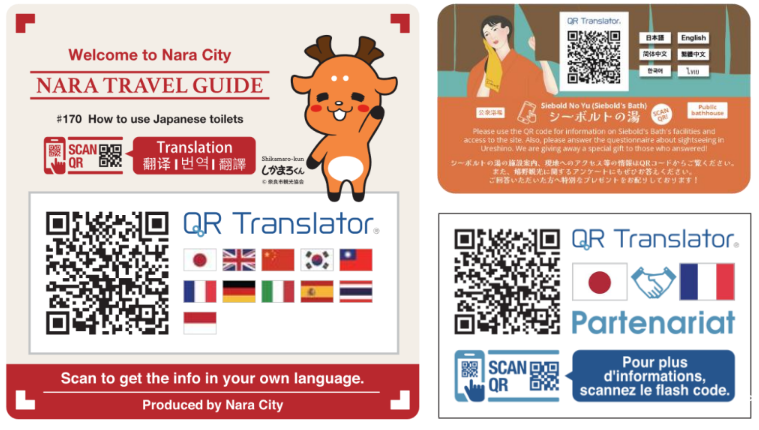
Clear instructions reduce hesitation and help users immediately understand the value of scanning the QR code.
6. Ensure Adequate Lighting
If the QR code is printed on a panel or sign, make sure the area is well lit.
Cameras need sufficient contrast and lighting to distinguish QR codes clearly, especially in indoor or low-light environments.