
Upload audio files
In this article
This article explains how to upload and manage audio files for QR code translations.
By default, QR Translator uses Text-to-Speech (TTS) to generate audio automatically. You can also upload your own MP3 audio files when you need a human-recorded voice with precise pronunciation.
How to upload and use audio files
- All audio settings are managed from the QR codes Code Overview panel. To access the Code Overview panel, open the Dashboard, find the code you want to edit and click the icon.
- Under Text to Speech / Upload Audio, click the icon.
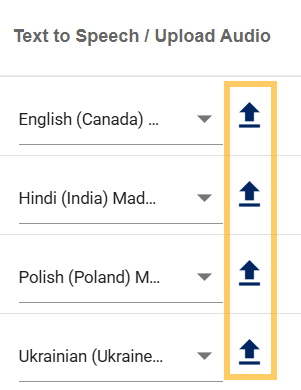
- Click Upload

- Select the file you want to upload and click Open to upload the file.
- Double click the uploaded file to use it.
How to remove an audio file from a translation
- Open the Code Overview panel. (See step 1 of How to upload and use audio files).
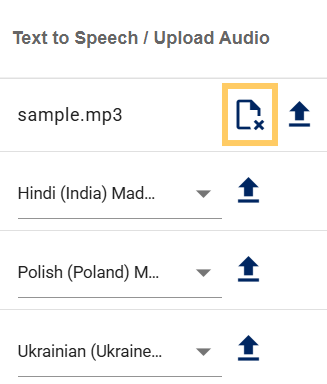
- Find the audio file and click the icon. This will remove the audio file from the translation.
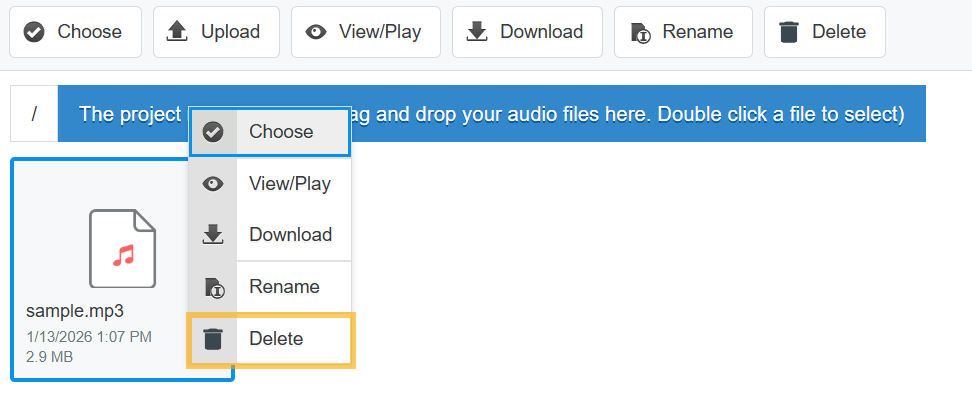
- To remove the audio file from the server, click the icon, right click the audio file, and click Delete.
Was this helpful?
YesNo